Your Google Authenticator export QR code is not encrypted
The "Transfer accounts" QR is base64 protobuf — every 2FA seed in plain sight. Here is the format, the risk, and a browser-only decoder that reads it.
Open Google Authenticator, tap Transfer accounts → Export accounts, pick every entry, and the app draws a dense QR code on your screen. The instruction is to scan it with the other phone. The implication most people take away is that the QR is some kind of sealed envelope between two devices.
It is not. It is a base64 string containing a protobuf message, and inside that message are your TOTP seeds — the actual shared secrets, in the clear, one per account. Anyone who ends up with a picture of that screen holds a permanent second factor for every account in the batch.
This is not a vulnerability report; the format has been public for years and is arguably the right engineering call. But it is a fact worth internalising before the QR is on a screen you are sharing. The TOTP Generator now decodes these exports in the browser, which makes the point concrete: paste the payload, see every seed.
Key Takeaways
| What people assume | What is actually true |
|---|---|
| The export QR is encrypted for the target device | It is base64-encoded protobuf, with no encryption and no key exchange |
| Scanning it requires Google Authenticator | Any QR reader plus a 40-line decoder recovers every account |
| A leaked QR is like a leaked 6-digit code | A code expires in 30 seconds; a seed generates valid codes forever |
| Exporting is a low-risk convenience action | It concentrates every second factor you own into one screenshot |
| Only the target app can use the seeds | The seeds are standard RFC 6238 — they import into any authenticator |
- The payload carries the seed, not a code. Compromise is permanent until you re-enrol each account.
- Screenshots of that QR end up in cloud photo backups, screen-share recordings and support tickets. Treat one exactly like a password file.
- The decoding is arithmetic, so it needs no server: the TOTP Generator unpacks an export entirely in your browser and shows you what is inside.
What the export actually contains
The QR encodes a single URI:
otpauth-migration://offline?data=Cj4KCs7x1cjxTyEJFYASDWFkZW...The data parameter is base64 (URL-encoded in the QR, so you will see %2B and %3D if you read it raw). Decode it and you get a protobuf message with this schema — published by Google in the Authenticator source, and unchanged for years:
message MigrationPayload {
  enum Algorithm  { ALGO_UNSPECIFIED = 0; SHA1 = 1; SHA256 = 2; SHA512 = 3; MD5 = 4; }
  enum DigitCount { DIGITS_UNSPECIFIED = 0; SIX = 1; EIGHT = 2; }
  enum OtpType    { OTP_UNSPECIFIED = 0; HOTP = 1; TOTP = 2; }

  message OtpParameters {
    bytes secret      = 1;   // the raw seed — NOT base32, NOT hashed
    string name       = 2;   // account, e.g. alice@example.com
    string issuer     = 3;   // service, e.g. GitHub
    Algorithm algorithm = 4;
    DigitCount digits = 5;
    OtpType type      = 6;
    int64 counter     = 7;   // HOTP only
  }

  repeated OtpParameters otp_parameters = 1;
  int32 version    = 2;
  int32 batch_size = 3;   // exports over ~10 accounts split across several QRs
  int32 batch_index = 4;
  int32 batch_id   = 5;
}
Read field 1 of each OtpParameters, base32-encode those bytes, and you have the string you would have typed in during enrolment. There is no wrapping, no passphrase, no device-bound key, and no expiry. Note also what is absent: there is no period field, because Google always exports 30-second steps.
Two details matter more than they look:
secretis raw bytes. Enrolment pages show you base32 (JBSWY3DPEHPK3PXP); the export carries the underlying bytes. Converting between them is a lossless encoding step, not a security boundary.batch_size/batch_index. A large account list becomes several QR codes. Each one is independently decodable, so “I only leaked one of the three screens” means you leaked a third of your seeds, not zero.
The seed is the whole authenticator
The distinction that makes this worth writing about is the same one that separates a JWT from its signing key.
A code — 423 307 — is a bearer artefact with a 30-second life. Leak one and the window is small, and often already closed by the time you notice.
A seed is the generator. Anyone holding it produces the correct code, at any moment, indefinitely, from any device — and it is indistinguishable from the code your phone produces, because it is the code your phone produces. There is nothing to detect and nothing to revoke short of removing the authenticator from the account and enrolling again. If your export covered fifteen services, that is fifteen separate re-enrolments, each with its own recovery-code regeneration.
That asymmetry is why “it was only on screen for a moment” is not a comforting sentence about an export QR, and is a perfectly comforting one about a live code.
See it for yourself, locally
Here is the export from a throwaway account, pasted into the TOTP Generator. The tool recognises the otpauth-migration:// scheme on sight, unpacks the batch, and lists every account it found:
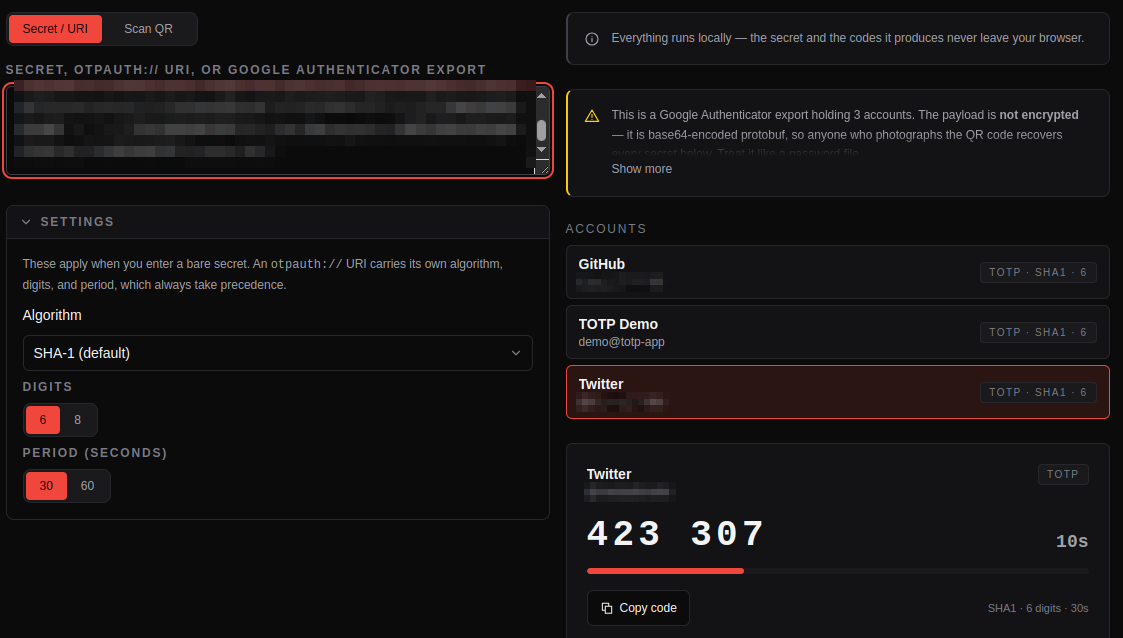
The payload and the account handles are pixelated here; the tool itself shows them in full, on your machine only.
Three things are worth pointing out in that screenshot.
The warning fires before anything else. Any decoded export gets a callout stating the account count and that the payload is unencrypted, because the single most useful thing a decoder can do with this format is tell you what you are actually holding.
Each account is generatable. Select an entry and it renders the same live card the tool gives a single secret: the current code, the countdown to rollover, algorithm, digit count and period. That is the confirmation that the seeds are real and complete — not an inference, a working code.
Every account exposes its own Base32 secret and otpauth:// URI. This is the practically useful half. The tool reconstructs the standard single-account URI for each entry:
otpauth://totp/GitHub:alice?secret=Z3Y5LSHRJ4QQSFMA&issuer=GitHub&algorithm=SHA1&digits=6&period=30which is exactly what any other authenticator expects. Copy it, feed it to the QR Code Generator, and scan it with Aegis, 2FAS, Bitwarden, 1Password or Keeper — one account at a time, without handing your whole batch to an importer you have not audited.
Counter-based HOTP entries and the exotic MD5 variant are listed with their secrets but marked as not generatable, rather than being silently dropped: the tool produces time-based codes, and pretending otherwise would be worse than saying so.
All of this runs in the tab. There is no request when you paste, no backend to log the payload, and no analytics call carrying your seeds — verify it the way you would verify any such claim, by opening the tool with the network disconnected. For the reasoning behind that constraint, see the privacy-first manifesto; for the same argument applied to token debuggers, online JWT decoders that log your secrets.
The command-line equivalent
If you would rather not paste it anywhere at all, the decode is short enough to write inline. Read the QR with zbarimg, then:
import base64, urllib.parse, sys

data = urllib.parse.unquote(sys.argv[1].split("data=", 1)[1])
raw = base64.b64decode(data + "==")   # tolerate stripped padding

def varint(b, i):
    r = s = 0
    while True:
        x = b[i]; i += 1
        r |= (x & 0x7F) << s
        if not x & 0x80:
            return r, i
        s += 7

def fields(b):
    i = 0
    while i < len(b):
        k, i = varint(b, i)
        num, wire = k >> 3, k & 7
        if wire == 0:
            v, i = varint(b, i)
        elif wire == 2:
            n, i = varint(b, i); v, i = b[i:i + n], i + n
        else:
            raise ValueError(f"wire type {wire}")
        yield num, v

for num, v in fields(raw):
    if num != 1:
        continue
    p = dict(fields(v))
    print(base64.b32encode(p[1]).decode().rstrip("="),
          p.get(3, b"").decode(), p.get(2, b"").decode())
That is the entire attack, if you want to call it that: forty lines and no cryptography. The browser tool is the same logic in TypeScript — the point of showing both is that neither one needs privileged access to your export. Only the picture does.
Why Google ships it unencrypted
It is easy to read “no encryption” as negligence. The design constraints make it a defensible trade-off:
- There is no shared key to encrypt to. The two phones have never met. Any real encryption needs either a passphrase the user types on both devices, or a key exchange over some channel — and the whole appeal of the flow is that it works offline, with no account, in ten seconds.
- QR capacity is unforgiving. A version-40 QR holds a few kilobytes at best. Adding a KDF salt, nonce and authentication tag per batch eats capacity that seeds and labels currently use, forcing more screens and more scans.
- A passphrase would be the weakest link anyway. A user-chosen, once-typed transfer passphrase, entered under time pressure while holding two phones, is not a strong key. It would mostly add the appearance of protection.
- The exposure window is meant to be seconds. The threat model assumes the QR exists on a screen briefly, in your hand, and is never persisted.
That last assumption is the one that breaks in practice — because the reflex, when a QR fails to scan or the second phone is not to hand, is to screenshot it. And a screenshot is a file, and files sync.
Contrast the alternative that some other apps ship: an encrypted vault export where you supply a passphrase and the file is meaningless without it. That is strictly better for backups, and strictly worse for the ten-second device-to-device flow Google is optimising. Both choices are coherent. What is incoherent is assuming you got the first one when you used the second.
Handling an export safely
If you are about to migrate, the whole risk sits in a two-minute window and is entirely manageable:
- Never screenshot the QR. If a transfer fails, generate a fresh export — they are free, and it is the screenshot that outlives the incident.
- Check what is on screen behind you. Not just people: screen recorders, meeting software, and anything mirroring to a TV. The QR is machine-readable from a surprisingly bad camera angle.
- Do it offline if you can. Aeroplane mode on both devices for the transfer changes nothing functionally and removes every accidental-upload path.
- Decode your own export once, deliberately. Knowing exactly which fifteen accounts are in there is genuinely useful — it is the only inventory of your second factors you will ever get in one place. Do it in a tool that does not transmit it.
- Delete stray copies afterwards. The photo, the screenshot, the “just in case” note, and — the one people forget — the cloud photo backup and its trash folder, which retains deleted items for weeks.
- If a QR has been exposed, re-enrol. Not “monitor for suspicious logins”. Remove the authenticator from each affected account, enrol again, and regenerate the recovery codes, because those were often shown in the same session.
The rule mirrors the one for any leaked key: a seed that touched a third party is a disclosed seed. Arguing about whether anyone actually decoded that screenshot is unbounded; re-enrolling fifteen accounts is an afternoon.
What this means for your backups
There is a constructive reading of all this. Because the export is a documented, unencrypted, standard-conforming format, you are not locked in. Your seeds are yours, portable to any RFC 6238 client, and a stack of otpauth:// URIs is a perfectly good archival format — as long as you treat that stack with the same care as a password vault.
The workflow that follows from that:
- Export from Authenticator, decode it in the TOTP Generator, and confirm each account produces the code your phone shows.
- Copy each
otpauth://URI into your existing password manager as a secure note or TOTP field — one that is already encrypted at rest and already part of your recovery plan. - Regenerate per-account QR codes with the QR Code Generator when you enrol a new device, instead of re-running a bulk export.
- If you receive a QR image from elsewhere and want to know what it claims to be before you scan it into anything, read it with the QR Code Reader first.
That gives you the redundancy people are really after when they screenshot the export, without leaving an unencrypted copy of every second factor in a photo library.
Conclusion
Google Authenticator’s export QR is a plain, unencrypted container: base64 protobuf, seeds in field 1, readable by any competent developer in an afternoon. That design is a reasonable answer to a hard constraint — two devices with no shared key, ten seconds, one small QR — and it is completely fine, right up until the QR is persisted as a file.
Understanding the format is what converts it from a mystery into a tool. You can audit what is in your export, migrate to an app you prefer, and keep your seeds somewhere already encrypted. The TOTP Generator does the decoding step in your browser, tells you plainly that the payload is not encrypted, and never sends it anywhere — which is the only sensible place to open a file containing every second factor you own.
Frequently Asked Questions
Is the Google Authenticator export QR code encrypted?
No. It contains an otpauth-migration://offline?data=... URI whose data parameter is a base64-encoded protobuf message. Each account’s shared secret appears as raw bytes in that message, with no encryption, passphrase or device-bound key. Anyone who obtains a readable image of the QR can recover every seed in it.
What happens if someone photographs my export QR code?
They obtain the TOTP seed for every account in that batch, which lets them generate valid 6-digit codes indefinitely, from any device. Unlike a leaked code, which expires in 30 seconds, a leaked seed remains valid until you remove the authenticator from each affected account and enrol again. Regenerate recovery codes at the same time.
Can I import a Google Authenticator export into another app?
Yes. The seeds are standard RFC 6238 secrets, so any authenticator accepts them. Decode the export into per-account otpauth://totp/... URIs — the KitBoxDev TOTP Generator does this in the browser — then either paste each URI into your new app or render it as a QR code and scan it. This works with Aegis, 2FAS, Bitwarden, 1Password and Keeper.
How do I decode an otpauth-migration URI?
Base64-decode the data parameter and parse the result as a protobuf MigrationPayload. Each repeated field 1 is an OtpParameters message whose field 1 is the raw secret; base32-encode it to get the familiar enrolment string. It takes about forty lines of Python, or one paste into a local decoder — no cryptographic operations are involved.
Why does an export sometimes produce several QR codes?
Google splits large account lists across batches, recorded in the payload’s batch_size and batch_index fields. Each QR is a complete, independently decodable message containing a subset of your accounts, so all of them must be scanned to transfer everything — and each one leaks its own subset if exposed.
Is it safe to decode my export in an online tool?
Only if the tool performs the decode in your browser and transmits nothing. Since the payload contains every seed in plain form, a server-side decoder receives all of your second factors in one request body — which can then land in access logs, APM traces or error reports. Test by disconnecting from the network: if the tool still decodes, the computation is local.
Does the export include HOTP accounts and unusual settings?
Yes. The format carries the OTP type, algorithm (SHA1, SHA256, SHA512 or MD5), digit count and, for HOTP, the current counter. It carries no period field, because Google exports 30-second steps only. A decoder should surface HOTP entries rather than hide them — their secrets are just as sensitive, even though time-based generators cannot produce their codes.